Publishers make consequential decisions from analytics: which topics to commission, which formats to double down on, which content turns readers into subscribers. When consent declines strip out a large share of your audience before GA has counted them, those decisions are based on gaps, not reality.
Google Analytics is built for ad teams, not editorial ones. It requires a cookie banner, it’s complex to navigate, and it’s blocked at higher rates by the privacy-conscious audiences that many publications depend on. Sponsor traffic figures and subscription attribution both become approximations.
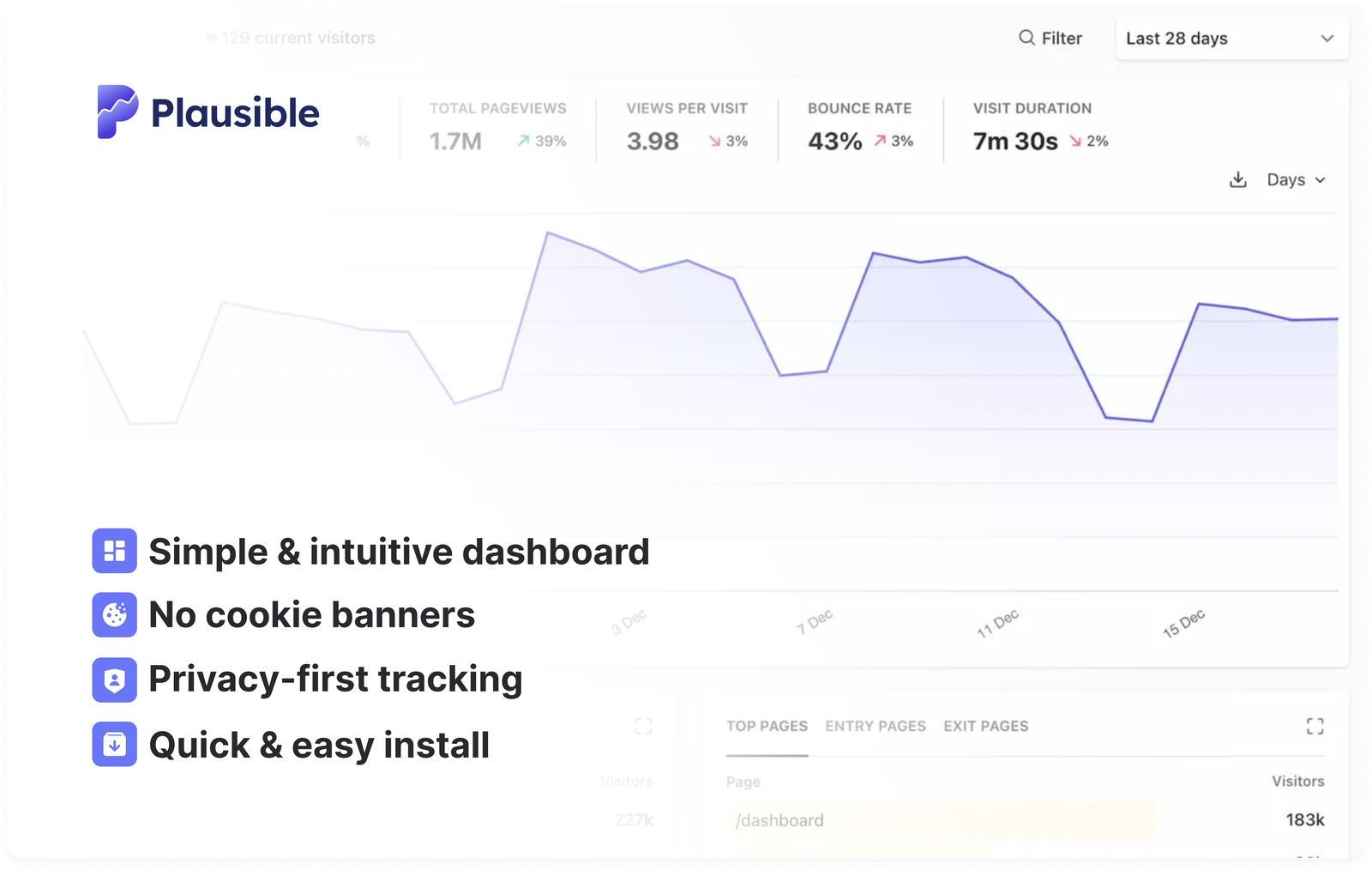
Media companies and digital publishers are one of the largest groups using Plausible, from large editorial teams and SEO-driven sites to indie blogs, newsletters and creator-led publications. Plausible gives you complete, accurate data with no cookie banner and a one-page dashboard any editor can read without training.
"I integrated Plausible analytics on this site. On top of the very small footprint of the analytics script and no-tracking-and-not-selling-your-data-for-advertising part."
"I mainly use Plausible for my site's analytics. I really like them: they're privacy-focused, open source and show me exactly the subset of data I want to see. Most importantly, they don't set cookies."
- Why Google Analytics falls short for publishers
- How publishers use Plausible
- Understand which stories resonate with readers
- Understand how readers discover your content
- Analyze your SEO performance and organic traffic
- See what readers are engaging with at this moment
- Connect content to subscriptions and revenue (codeless)
- Track monetization metrics and ad engagement
- See where your audience is located
- Track A/B test results
- Share stats with your team
- Easy to integrate with your publishing platform
- Other teams use Plausible for
- Try Plausible
Why Google Analytics falls short for publishers
Google Analytics brings several problems for most websites. For publishers and content teams, there are some specific ones worth understanding.
Google Analytics is overwhelming and overkill
Google Analytics collects so much data from website visitors that it can showcase more than 125 different reports and almost 300 individual metrics. You’ll rarely need more than a handful of them. This makes GA overkill for most content teams and publishers.
Many try to simplify GA by creating custom reports and dashboards. Some even take training courses just to understand the different metrics and get something useful out of it.
Plausible is built with simplicity in mind. Anyone can understand the metrics at a glance without training or prior analytics experience. Everything you need is on one page.
You can get an overview of all the most actionable metrics in a minute and get back to writing.
Google Analytics requires a privacy policy, cookie prompt and user consent
Google requires you to have a privacy policy covering your use of Google Analytics, disclose your use of cookies, and obtain user consent where required by law.
When visitors decline cookies, their activity goes untracked. According to an independent study, this can cause more than half of your data to be missing.
Google Analytics also places multiple cookies on visitor machines, which means you need a cookie consent banner too.
Plausible is compliant with GDPR, CCPA and PECR out of the box. We don’t use cookies and we don’t collect personal data. That means no analytics cookie consent banner and no consent prompts. You can focus on creating content.
Google Analytics slows down your site and worsens the visitor experience
Google Analytics collects far more data than most sites need, and the script weight shows. The Google Analytics tracking script is 135KB gzipped. Speed tests including Google’s own PageSpeed Insights regularly flag it as something slowing your site down.
Plausible’s script is 2.5KB gzipped, which is 54 times smaller. Your site stays fast and your visitors get a smooth experience. See how it adds up with our analytics script size calculator.
Google Analytics is inaccurate
Google Analytics is the most widely used tracking script on the web. This makes it a big target. Browsers such as Brave and privacy extensions like uBlock Origin block Google Analytics by default, and some browser privacy settings can also prevent it from running.
These are used by millions of web users who won’t be counted in your website statistics. It’s not uncommon to see 40% or even more of the audience on a tech website blocking Google Analytics.
This means your analytics may underreport traffic and engagement, especially for audiences that are more privacy-conscious.
Plausible is privacy-friendly by default, so it sees significantly less blockage. We also offer a proxy that lets you run the script as a first-party connection from your own domain, giving you more accurate (and often higher) visitor counts.
In a test we conducted, we simulated bot traffic to a website and found that GA4 failed to detect it, counting the bots as real users, while Plausible correctly identified and excluded them.
How publishers use Plausible
Understand which stories resonate with readers
Among your hundreds or thousands of articles, some perform well immediately while others build long-term readership. Plausible makes it easy to see how each story performs.
Open the Top Pages report in your Plausible dashboard. You can quickly see which pages attract the most readers and how those readers engage with each story.
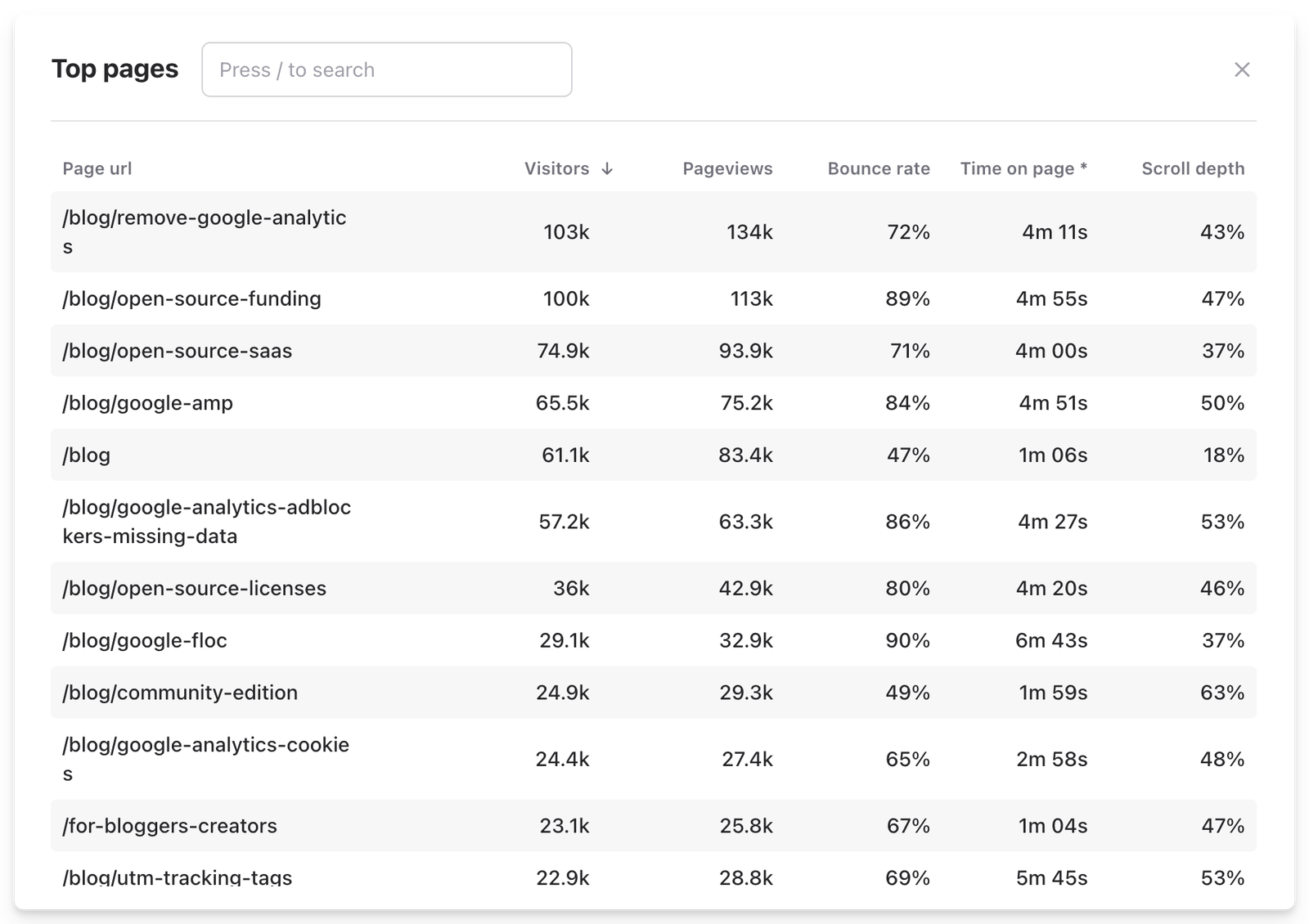
The report includes metrics such as:
- Visitors and pageviews to show which stories attract the most attention
- Bounce rate to see how many readers leave without exploring further
- Time on page to understand how long readers stay with the article
- Scroll depth to see how far readers move through the story
For long-form journalism or feature stories, the engagement signals especially help editorial teams see whether readers stay with the article or leave early.
These insights help shape editorial planning and identify the topics that matter most to your readers.
Understand how readers discover your content
Publishers rely on multiple channels: search, social, newsletters, direct, and increasingly AI platforms like ChatGPT or Perplexity. The Channels, Sources and Campaigns tabs in Plausible show where your readers come from and let you compare channels by engagement, not just volume.
You can also use UTM parameters to measure specific campaigns, such as how many readers a particular newsletter edition sends to your site. Combined with goal tracking, you can see which sources actually drive subscriptions, not just pageviews.
Analyze your SEO performance and organic traffic
Search remains one of the most important ways readers discover content.
In Plausible, open the Channels tab and filter by Organic search. You can see which articles attract search traffic and which continue to perform long after publication. The Entry Pages tab shows the pages actually pulling in organic visitors.
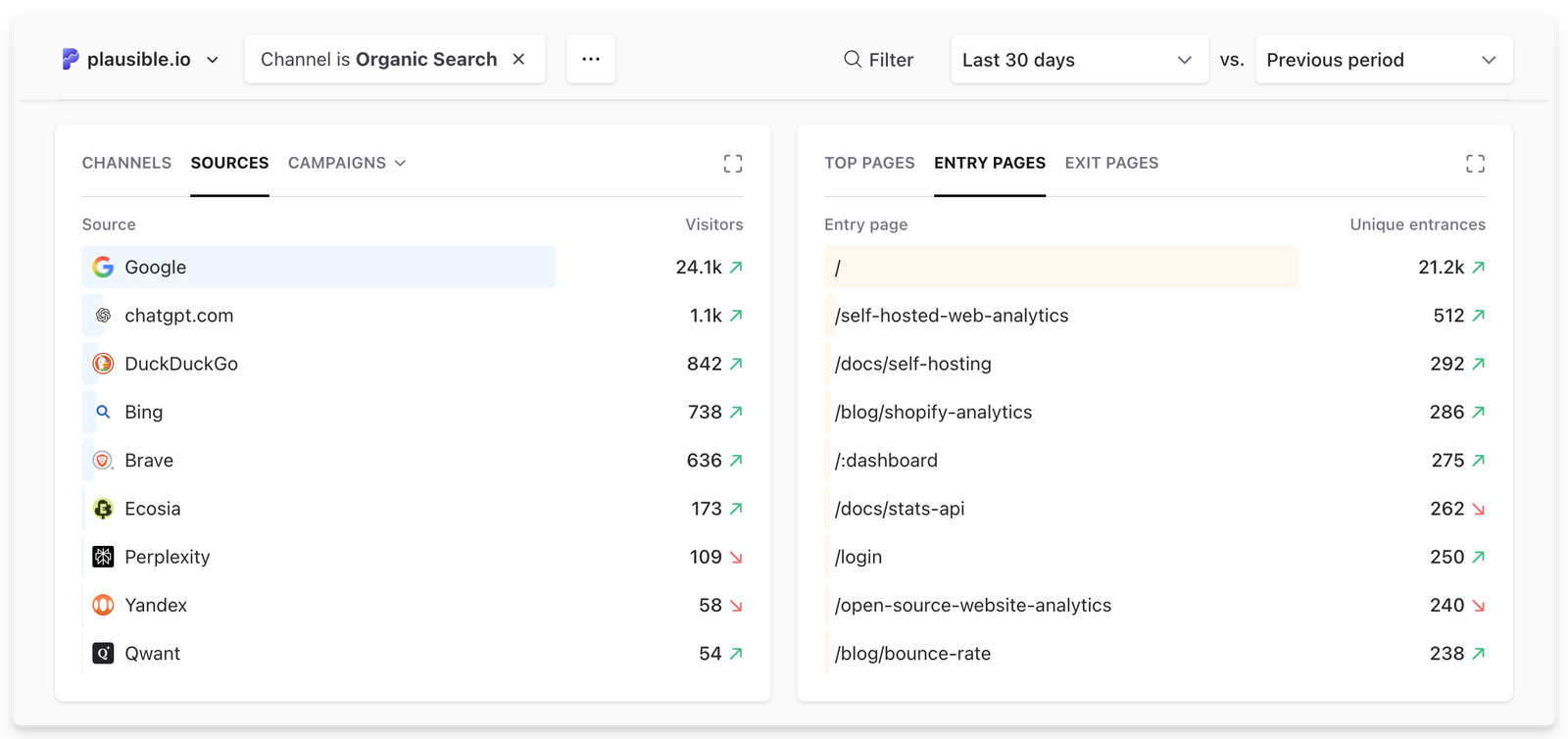
You can even connect Search Console to Plausible to see the search terms in Google bringing you traffic and a better analysis of SEO efforts.
This helps you see not just what ranks, but which content keeps bringing readers back over time.
See what readers are engaging with at this moment
Publishing is often fast-moving. Editors want to understand how newly published stories perform as readers discover them.
Plausible includes a real-time analytics view that shows what is happening on your site at this moment.
You can see:
- how many readers are currently on your site
- which articles they are reading right now
- where those readers are coming from
- what goals were met in the last 30 minutes
This helps editorial teams quickly identify when a story is gaining traction.
For example, if an article suddenly receives traffic from social media or search, editors may move it higher on the homepage, promote it in newsletters, or share it across social channels.
Connect content to subscriptions and revenue (codeless)
For many publishers, subscriptions, memberships, and newsletters are essential sources of revenue. Knowing which stories contribute to those outcomes helps you make smarter editorial decisions.
Plausible lets you track meaningful goals such as:
- newsletter signups
- subscription conversions
- clicks on key calls to action
…and tie any goal to revenue so you can see it alongside traffic sources, top content and geographies in one dashboard.
You can use codeless form submissions tracking for newsletter signups, or set up pageview goals to track a /thank-you or /subscription-confirmed page without writing any code.
You can also chain multiple goals into a funnel to measure drop-off across a defined sequence of steps, or use user journeys to discover the paths readers actually take.
Track monetization metrics and ad engagement
You can track custom events (with revenue tracking) and custom properties such as ad clicks or affiliate link interactions to better understand which content contributes most to revenue.
For example, you may want to measure how often readers click ads or affiliate links inside articles.
You could track this as a custom event such as “Affiliate link click” or “Ad click”. Each time a reader clicks one of these links, the event is triggered. You can then attach custom properties to add more context about the interaction, such as:
- Link type (affiliate link, sponsor link, or internal promotion) to see which performs best
- Placement (sidebar, inline within the article, or end of article) to see which placements drive the most engagement
You can also attach properties to individual pages to add more context, such as:
- Post author to see which writers drive the most traffic or conversions
- Category or section (e.g. News, Opinion, Guides) to see what resonates most with readers
- Content type (article, review, tutorial)
In Plausible, these events appear in the Goals tab, where you can filter and break down the data using those properties.
See where your audience is located
The Countries, Regions and Cities tabs show which countries and regions your readers come from. For publishers who monetize via display ads or sponsorships, audience geography matters: ad rates and sponsor interest vary significantly by country. Knowing your geographic mix helps you understand the value of your audience, not just its size.
Track A/B test results
Headlines, images, and article presentation often determine whether readers click and continue reading.
You can use custom properties to tag which variant a visitor saw, then compare performance in Plausible to see which version drives more engagement or conversions. See our guide to A/B testing with Plausible.
Share stats with your team
You can invite team members and assign roles: view-only access to the dashboard, or full access to manage settings. See more on user accounts and roles.
Set up weekly or monthly email reports to keep editors and stakeholders informed without requiring a login. Or generate a private shared link to the dashboard for anyone who needs occasional access.
Easy to integrate with your publishing platform
Plausible can be added to any website with a simple script, and it works smoothly with most publishing platforms and CMS tools.
Many publishers run their sites on WordPress, Ghost, Drupal, or custom CMS setups. You can find setup guides for most popular platforms, and there is a dedicated WordPress plugin that takes a few minutes to set up.
If your publishing platform already includes traffic reports, first compare what its built-in analytics covers and what an independent tool would add. That helps you avoid installing a second tool to answer a question your existing dashboard already handles.
Other teams use Plausible for
- SaaS products: tracking trial signups, activation funnels and campaign attribution
- Ecommerce: revenue attribution and checkout funnels without cookies or consent banners
- Agencies and freelancers: multi-site management, client reporting and GDPR compliance built in
- Public sector: EU-owned hosting, no consent banners and a clear procurement path for public institutions
Try Plausible
Start a free 30-day trial. No credit card required. Run it alongside Google Analytics, compare your traffic numbers and use the Google Analytics importer to bring your historical data across when you switch.
Larger organization? If your team needs Single Sign-On or a managed proxy, see enterprise web analytics.